BGScrub / Guides
Batch remove backgrounds from a whole folder.
A product range, a team’s headshots, a season of listings: when you have dozens of images, doing them one by one is the slow part. BGScrub batch mode takes them all at once and gives you one ZIP back.
Where batch lives: batch processing is part of BGScrub Pro in the Chrome extension, which is on the Chrome Web Store. The free website handles one image at a time.
How batch works in the extension
- Open BGScrub in Chrome’s side panel.
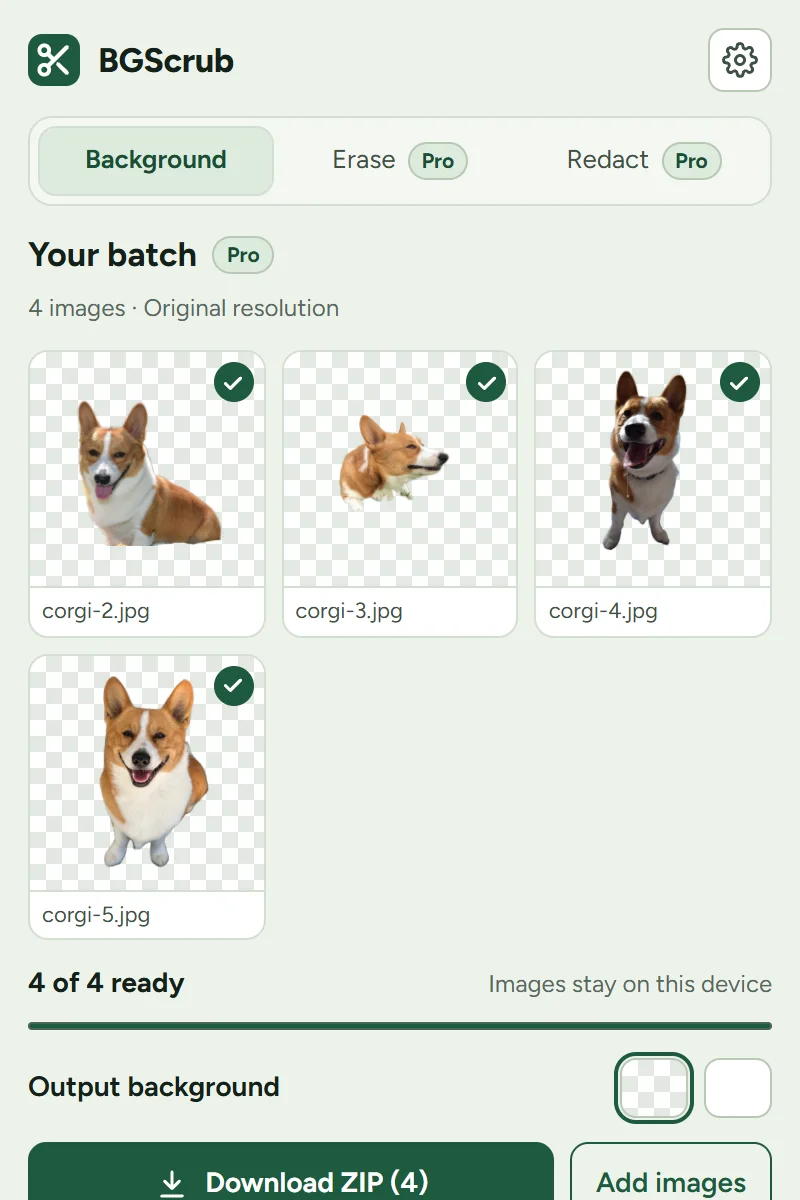
- Drop several images onto it at once. BGScrub switches to batch by itself, and Add images adds more.
- Pick one output background for all of them: transparent or white.
- BGScrub works through the queue on your computer and shows each cutout as it finishes.
- Download everything as a single ZIP, every image at its original resolution.
Why batch on your own device
- No upload queue. Nothing is sent to a server, so a big batch isn’t limited by your upload speed, and unreleased products stay private.
- No per-image credits. Pro is a flat price ($1.99/month, $20/year or $35 lifetime), not a meter that charges per cutout.
- Original resolution, every time. No downscaled previews you have to pay again to get at full size.
Speed depends on your computer. In our tests on a recent graphics chip (WebGPU), an 11-megapixel photo took 1.7 seconds once the model was loaded; on the processor alone it is slower.
Just a few images?
For a handful of images, the free web tool is quick: drop an image, download, drop the next. You get 3 full-resolution saves a day and unlimited saves at 1,024 px. If you are preparing listings, the product photo guide has tips for cleaner cutouts.
Questions
How many images can I batch at once?
There is no per-image credit limit; the practical limit is your computer’s memory and time. Very large photos (over 40 megapixels) are reduced to 40 megapixels before processing.
How much does batch cost?
The extension starts with a 14-day free trial that needs no card or account. After that, Pro is $1.99/month, $20/year or $35 lifetime.
Does batch upload my images?
No. Like everything in BGScrub, batch runs on your device. The only download is the background-removal model itself, once.
Try it on your own photo
Free in your browser. Nothing is uploaded, no account, no watermark.